Fortnite Guide: How to Claim the Kyo Sidekick Companion for Free
Dust off your Chapter 1 collectibles and claim an interactive robotic assistant for your locker without spending a single V-Buck.
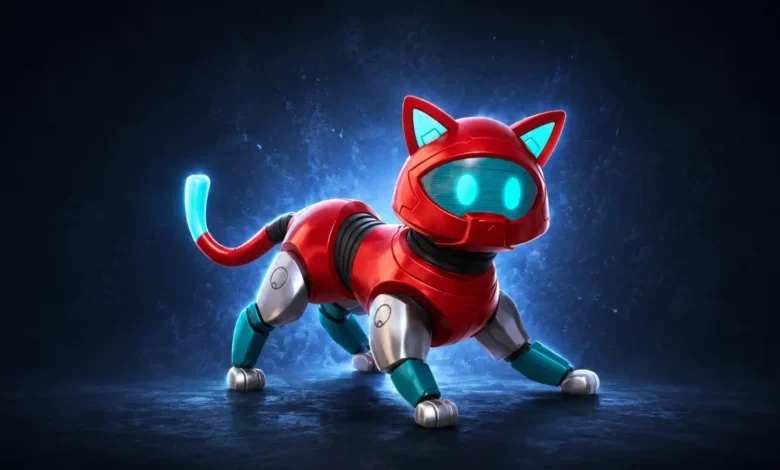
Quick Answer: The Kyo Sidekick is a newly updated, fully interactive companion in Fortnite Chapter 7 Season 3. If you reached Tier 28 during Chapter 1 Season 9, you automatically receive this mechanical buddy for free in your locker. Newer players can purchase it from the Item Shop for 1,200 V-Bucks.
Epic Games loves digging into its deep archives to give classic cosmetic items a shiny new purpose. Instead of leaving vintage items to gather dust at the absolute bottom of your locker menu, the developers have been systematically upgrading old animated pets into fully functional companions that trail behind you across the island. We already saw this blueprint succeed with the recent Kitsune and Empress re-releases, and now the futuristic mechanical critter Kyo is getting the exact same treatment.
Before you start aggressively scanning your active challenge tabs or hunting down hidden map coordinates to unlock this pet, you need to check your account’s purchase history. Getting your hands on this robotic helper depends entirely on your past island experience and your wallet.
How to Skip the V-Bucks Tax completely
You can bypass the checkout screen entirely for this drop, but your eligibility hinges on how long you have been dropping out of the battle bus. The unlock system relies entirely on your past battle pass progression.
The original Kyo pet back bling was a core reward tucked away at Tier 28 all the way back during Chapter 1 Season 9. If you successfully cleared that milestone years ago, the brand-new, full-fledged Sidekick version belongs to you without forcing you to complete a single in-game match objective.
How to Collect Your Loyalty Reward
Claiming your free mechanical helper is incredibly simple if you are a veteran player:
- Log into Fortnite using the exact same Epic Games account that holds your vintage Chapter 1 collectibles.
- Wait for the main menu to finish loading, which should automatically trigger a gift notification.
- If you clear the title screen and do not see an unlock announcement, jump straight into your locker tab.
- Sort your cosmetic categories specifically by the Sidekicks filter to find the updated robotic model waiting for orders.
Storefront Pricing and Playlist Support
If you skipped out on that specific futuristic season or you are running a relatively fresh account, you are completely locked out of the automatic loyalty tier.
Item Shop Arrival
You do not have to abandon your hopes of trailing a little robot behind your character model just because your account history is clean. The developers are officially bringing the Kyo Sidekick to the rotating storefront in the near future.
The real catch here is that convenience comes with a premium price tag. You will need to part with a decent chunk of change to secure the companion directly from the shop shelves.
| Companion Item | Acquisition Method | V-Bucks Cost |
| Kyo Sidekick (Legacy Player) | Automatic Account Grant | 0 V-Bucks |
| Kyo Sidekick (New Player) | Rotating Item Shop Purchase | 1,200 V-Bucks |
If you are looking for other high-tier pets to round out your active locker this week without spending a fortune, make sure to read our Fortnite Guide: How to Find and Master the Fishy Sprite to acquire a top-tier aquatic speed boost companion instead.

Taking Your Robot Into Battle
Once you have the mechanical pet locked into your collection, you can customize its appearance with various styles to fit your preferred skin setups. From there, you can deploy your robotic assistant to hover behind you across a wide variety of modes.
Unlike older back blings that were restricted to standard battle options, the new Sidekick system features extensive playlist support:
- Standard Battle Royale matches
- High-stakes Zero Build lobbies
- Custom building projects inside LEGO Fortnite
Dig through your archived inventory to see if you have that old Tier 28 badge from years ago. If you do, enjoy your free upgrade. Otherwise, you better start saving up your standard daily allowance for its upcoming Item Shop debut.