Forza Horizon 6 Guide: How to Conquer Japan With Your Crew
Your complete breakdown for setting up convoys, enabling crossplay, and dominating the Japanese streets with your squad.

Quick Answer: To unlock multiplayer in Forza Horizon 6, you must complete the intro prologue and win the initial Tokyo City street race with Mei. Once unlocked, you can form a Convoy of up to 12 players through the Online menu, tag your session for specific activities, and earn massive skill score multipliers by driving close together using the LINK Skills system.
Breaking the Social Barrier: How to Unlock Multiplayer
Tearing down neon-soaked highways and slide-tackling narrow mountain passes is an absolute blast on your own, but the Japanese festival truly hits its stride when you bring a squad along. Thankfully, the online setup functions as a seamless extension of your main career rather than forcing you to sit through sterile, agonizing matchmaking menus.
You cannot jump straight into a shared world the second you launch the game for the first time. The organizers force you to get a basic grip on the physics engine first. To tear down the multiplayer walls, you have to wrap up the introductory prologue sequence and conquer the first major street race through Tokyo City alongside Mei. The moment you cross that finish line in your borrowed Nissan Silvia, the entire suite of multiplayer modes opens up. You will instantly get access to everything from Spec Racing and Touge Showdowns to Hide and Seek and the Eliminator.
Grouping Up: Convoy Mechanics and Team Management
The absolute best way to ensure your squad stays glued to the exact same server instance is by forming a Convoy. Without a Convoy, crossing a regional boundary on the map risks fracturing your group and scattering your friends into completely different lobby shards.
Setting one up is incredibly simple. Pop open your pause menu, jump over to the Online tab, and select the option to create a Convoy. As the host, you can assign a behavioral tag to the session. This lets the game know exactly what your group is looking to do, allowing you to toggle between options like Road Racing, Drag Meets, Cruising, or completing Jobs.
| Multiplayer Constraint | System Rule and Operational Limit |
| Maximum Convoy Size | Capped at 12 drivers total per session (the Leader plus 11 invited friends). |
| Route Management | Only the designated Convoy Leader can place waypoints on the group map and launch events. |
| Progression Locking | Guests are locked into the Leader’s specific event choices, pausing personal career progression until you leave. |
Connecting Across Ecosystems
Because the game relies strictly on the Xbox platform network backend, you must have your friends registered on your Xbox social account regardless of where they actually purchased the game.
- On PC: Hit the Windows Key and G simultaneously to pull up the Game Bar overlay. Navigate directly to the Xbox Social panel, look up their unique Gamertag, and drop a friend request.
- On Xbox Consoles: Press the guide button on your controller, scroll over to the People tab, select Find Someone, and type in their Gamertag.
Once you are linked at the system level, your friends will automatically populate your in-game social menu for rapid-fire inviting. If your crew needs to build up some serious cash to fund matching team builds, reading our Forza Horizon 6 Guide: How to Work the Auction House will show you exactly how to flip your duplicate cars for massive payouts.
Troubleshooting Convoy Disconnections
Before you lose your patience over an invitation notification that keeps throwing connection errors, take a quick look at your system configurations. The biggest point of friction for modern lobbies is accidentally disabling crossplay at the system level. You need to double-check that crossplay is permitted inside your console’s privacy settings, and make sure the Online Crossplay toggle under the HUD and Gameplay section of the in-game menu is set to active.
Additionally, console players must maintain an active Game Pass subscription to touch any of the online modes. If you are playing solo while trying to scrape together the funds for that subscription, optimizing your offline race settings for maximum payouts is your smartest bet to keep your garage growing.
Exploiting Shared Spaces and LINK Skills
The open world functions like a living, breathing automotive playground. You can seamlessly roll your crew into dedicated Car Meets scattered across the regions to check out custom community builds up close. These spots are fantastic because they allow you to inspect specific tuning layouts, download custom paint wraps on the fly, or buy clean factory versions of those exact cars right from the local dealer menu.
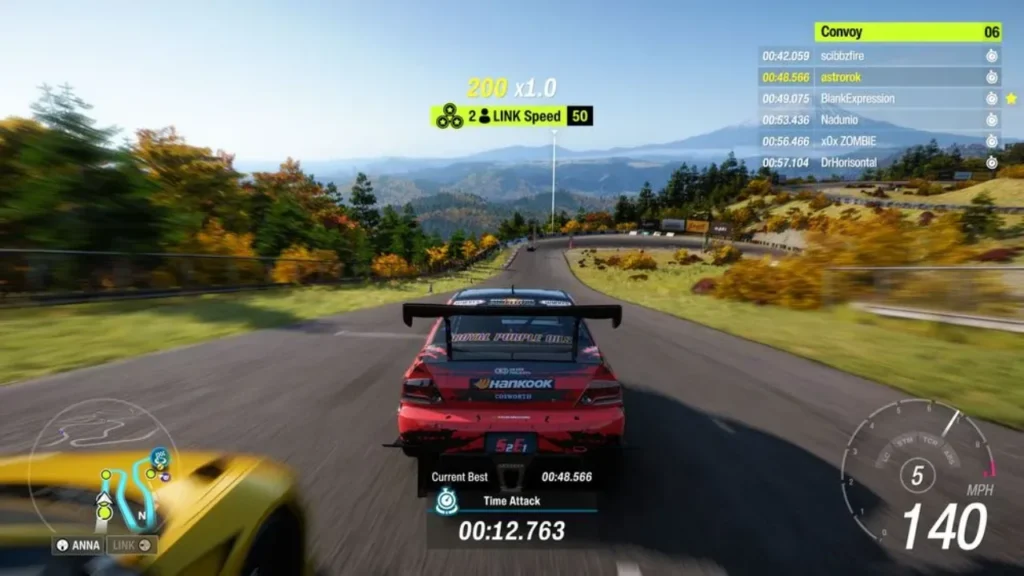
Once you hit the open asphalt together, the engine actively rewards your crew for tight, synchronized driving via the LINK Skills system. When you execute high-skill maneuvers at the exact same moment like tandem drifting a tight hairpin or catching major air off a stunt ramp together, the game triggers a distinct yellow-green Link notification. This rewards everyone in the immediate area with a massive multiplier boost to their active skill scores.